
Projects: Deep-dive
NESA Machine Readable Curriculum and MCP Server
Client
NSW Education Standards Authority
Industry
Webcoda is a Sydney digital agency. We have worked on the NSW Education Standards Authority's Digital Curriculum platform since 2022. First we rebuilt curriculum publishing on Kontent.ai, a headless CMS. Then we built NESA's Machine Readable Curriculum: a store of the syllabus that keeps every past version, and a content API that lets approved systems read it. It is published through Azure API Management, so NESA controls who gets access. In 2026 we added an MCP server, which lets AI assistants such as Microsoft 365 Copilot and Microsoft Teams read the current NSW curriculum directly. It is built and in testing with the NESA team.
Why NESA Moved Curriculum Publishing Off a Proprietary Platform
NESA came to us with a half-built curriculum publishing platform and a problem. It was being built on someone else's product, and that product could not do what NESA needed. It had been designed for university curriculums. Almost every NESA requirement meant customising or extending it. We were brought in to steer the platform in the right direction.
This is where most people misread the project. The NSW Digital Curriculum is not a website. It is the official record of every syllabus taught in New South Wales. Every learning area, every stage from Kindergarten to Year 12, every outcome, every content point, every prescribed text. Teachers use it daily, and schools, systems and assessment bodies rely on it. It also sits behind a curriculum reform with published dates, so publication cannot slip, and content that goes out wrong shows up in classrooms.
It was never only a screen, either. Teachers print curriculum content as Word or PDF documents, laid out differently from the site: no interactive parts, and their own choice of which syllabus sections and stages to include. So from day one the curriculum content had to be stored separately from the way any one destination shows it.
A platform carrying all that needs three things a normal site does not. Content structured the way a curriculum is actually organised, rather than the way a page is laid out. A record of every change that stands up to audit. And the ability to publish to more than one place, because the reader is not always a person.
Choosing Kontent.ai Headless CMS for Curriculum Content Governance
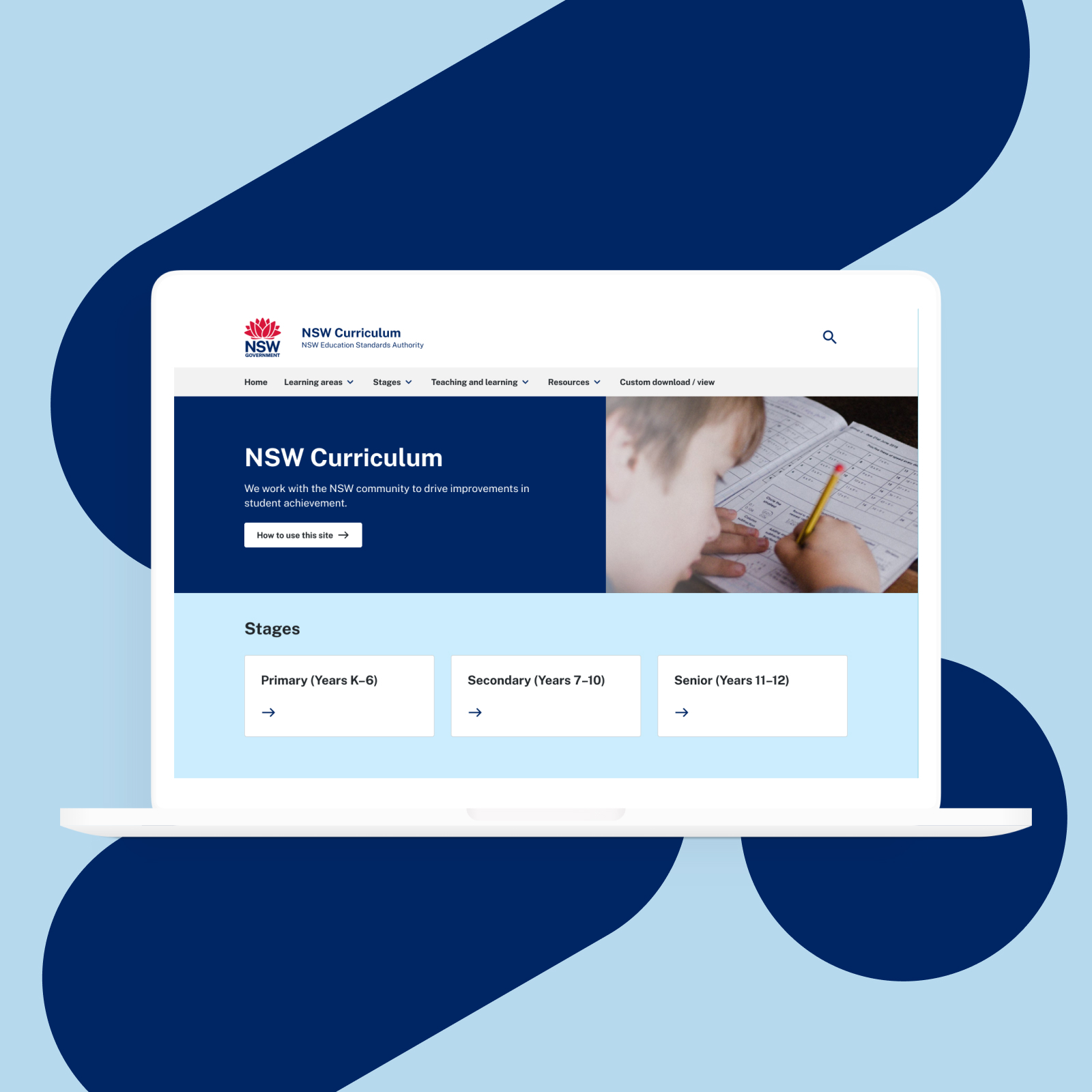
We moved curriculum publishing onto Kontent.ai, a headless CMS. "Headless" means the content is stored on its own, with no fixed page design attached to it. That was the whole point, not a technical preference.
A traditional CMS ties each piece of content to the page it appears on. That is fine when there is one place for it to go. NESA had at least three, and the third did not exist yet: the curriculum site teachers read, the Word document syllabus prints teachers need, and eventually any system that wanted to read the curriculum as data. Tie content to pages and that third one stays expensive forever.
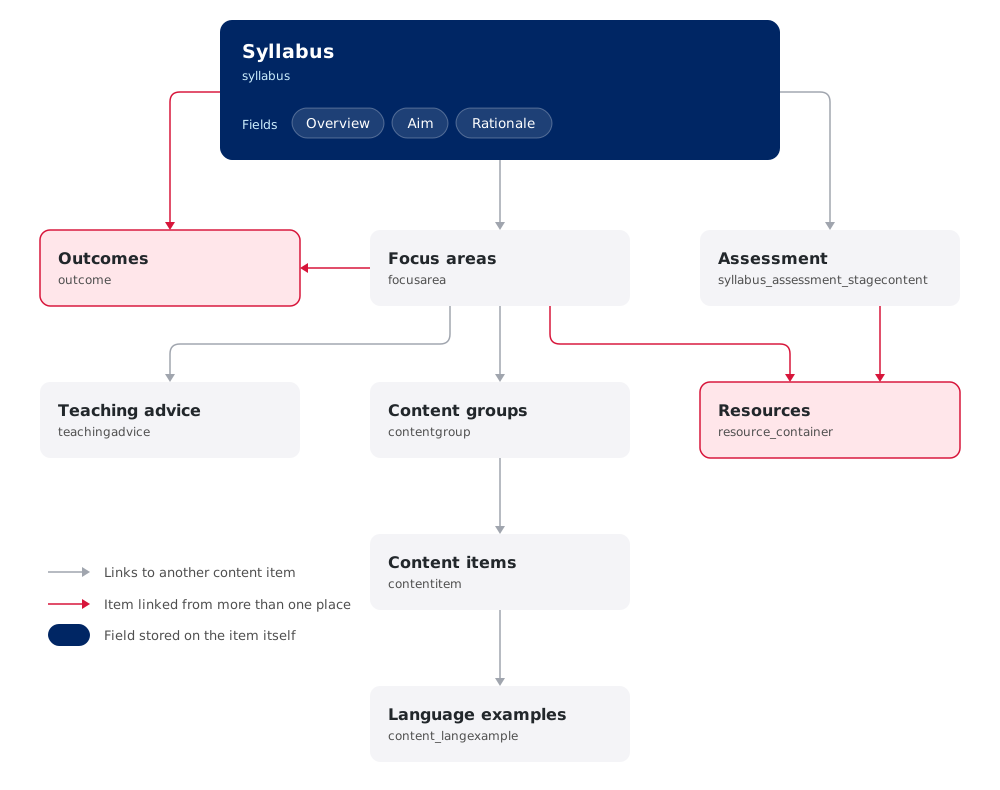
Kontent.ai let us store the curriculum as structured content, with the links between pieces recorded properly, and treat every output as one more view of the same source. It also gave NESA's curriculum teams a publishing process they own, with sign-off steps that match how a government agency actually approves content.
The option we advised against was staying on a system where the content followed the page design. It would have launched sooner. It would also have made everything further down this page either impossible or a rebuild.
Syllabus Version History: Why a Curriculum API Cannot Overwrite Content
One requirement shaped every decision after the CMS choice. A syllabus is a document with legal weight.
When a school reports on a student, when an assessment is written, when a teacher's program is audited, what matters is what the syllabus said at the time. Not what it says now. So the platform can never just overwrite content the way an ordinary CMS does. What the Stage 5 Mathematics outcomes said in June 2024 has to stay readable, word for word, indefinitely, next to what they say today.
That is why the Machine Readable Curriculum keeps history rather than replacing content. Every item keeps every version it has ever had. A system reading it can ask for the current version, an older version, or the full history of an item. Content changes in scheduled releases rather than continuously, so anyone reading it can say exactly which version they used. And NESA's team can see, item by item, what changed between any two releases.
Most systems like this treat history as a nice-to-have and are built for speed. This one was built to be accountable first, then made fast.
Sitting on content that other systems need?
That's the shape of problem we like. Thirty minutes, no pitch deck.
Building the Machine Readable Curriculum: Versioned Database, Sync and Content API
"Machine Readable Curriculum" is NESA's own term, and it appears in NESA's published tender for the work. It means what it says: the NSW curriculum, in a form software can read, not just people.
It has four parts.
-
The curriculum store
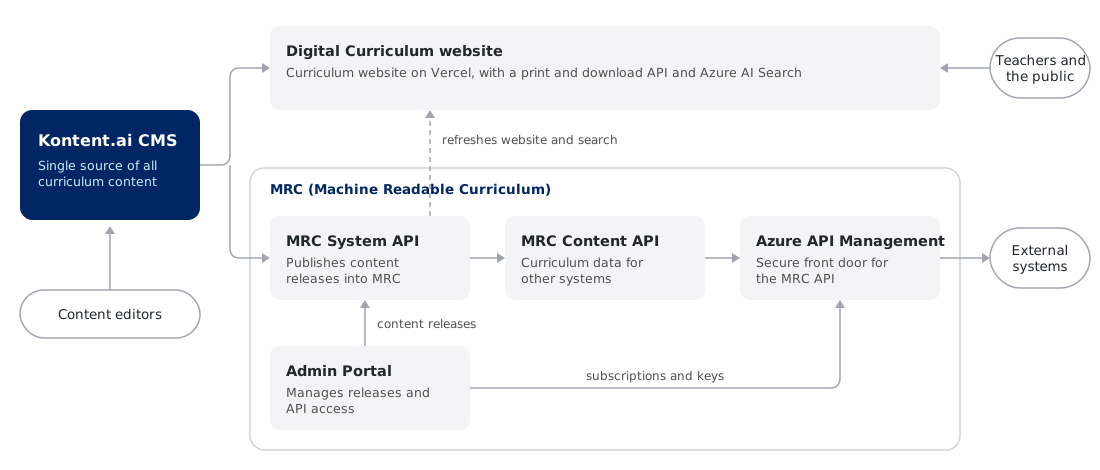
A copy of every published curriculum item, plus every earlier version of it, kept in step with Kontent.ai. Each update brings across only what that release changed. It also handles the awkward part of publishing: NESA's content team works on several things at once, the changes going out next and new syllabuses due much later, and both have to be safe to work on at the same time.
-
The content API
An API is how one system asks another for information. This one lets a system start at any item and step outwards to whatever is directly linked to it, one step at a time, until it has built up a whole syllabus. It can also run plain filtered lists across any type of item, without starting from a parent.
-
The admin portal
Where NESA runs it. Pull a set of CMS changes across, see a report of what changed, manage who has access, and read a full log of every update. Curriculum staff do all of that themselves.
-
Exports and reporting
Curriculum content out to Excel and CSV with the right column headings, with or without its history, and large exports handled in the background so nothing times out.
All of it is deliberately unexciting. A curriculum API that surprises anyone has failed.
Azure API Management for a Government Content API: Keys, Caching and Release Invalidation
The curriculum API is published through Azure API Management, Microsoft's front door for APIs. It is how a government agency safely runs an API other organisations will use. Each organisation gets its own key, which NESA can issue or switch off, and every request is logged against that key. So NESA can see who is reading the curriculum, and how much.
One detail is worth explaining, because it is the kind of thing that quietly breaks a system like this. To stay fast, Azure keeps a copy of recent answers and hands that out instead of asking again. That is exactly what you want for a curriculum that changes on set dates and is read constantly. But the moment a new release goes live, that saved copy is the old curriculum. So we tied clearing it to the release itself, rather than leaving it on a timer. Finishing a release marks the saved copies as out of date, and the next request gets the new content.
The API has also been through penetration testing, where security specialists try to break in on purpose. Findings were closed across the application, and across NESA's own infrastructure and Azure configuration.
Why We Built NESA an MCP Server Instead of a Curriculum Chatbot
First, what an MCP server is. The Model Context Protocol is an agreed way for AI assistants to connect to an outside source of information. An MCP server is the small piece of software that sits in front of your content and offers it to those assistants in a form they can use. Build one, and any AI assistant that speaks the protocol can read your content, on demand, from wherever the user already works.
We thought AI was where this was heading early on, and we raised the MCP approach with NESA well before it was the obvious answer. As AI assistants matured, NESA agreed it was the right direction.
The alternative was a chatbot on the curriculum site, and it was the shorter path. We had already proved the search technology behind one, using Azure AI Search. We argued against it, for a reason that has nothing to do with technology.
A chatbot means NESA pays for every question. Every teacher, every query, every follow-up is a cost NESA carries. So the more useful it gets, the more it costs, and sooner or later a budget conversation decides how useful it is allowed to be. For an agency serving every teacher in New South Wales, that is a pilot, not a service.
An MCP server turns that around. NESA publishes the curriculum once, in a form AI assistants can read. Teachers, schools and education companies connect using the AI subscription they already pay for, and ask their own questions on their own account. NESA's cost stays the same whether ten people use it or a hundred thousand.
None of that rules out a chatbot. For a defined group of people, a known set of questions and a volume you can predict, an assistant the organisation owns and controls can be exactly the right build. NESA's own internal teams are a good example. The economics only turn when the audience is every teacher in the state.
That is the difference between adding an AI feature and building AI groundwork, and it is the argument we would make to anyone holding content other people need. It is also the core of our AI services work.
"A chatbot means you pay for every question. An MCP server means every user brings their own subscription."
Chatbot or MCP server: the comparison in full
Both are legitimate. They fail in different places.
| Curriculum chatbot | MCP server | |
|---|---|---|
| Who pays per question | The organisation publishing the content | Each user, through the AI subscription they already have |
| Cost as use grows | Rises with every user and every follow-up | Flat, whether ten people use it or a hundred thousand |
| Control of the answer | Full. You own the interface and the wording | Shared. The assistant writes the reply, but you decide what content it gets and set the rules it follows: don't change the wording, don't reorder lists, always link back to the source |
| Where it fits | A known audience, predictable volume, a controlled experience | Content that many people and systems need, at public scale |
Building an MCP Server Over a Content API for Microsoft 365 Copilot and Teams
The MCP server sits on top of the curriculum API rather than alongside it, which is why building the API properly first mattered. It asks for content the same way any other system does, with its own key, through the same front door. So there is one way in to the curriculum and one set of access rules, whoever is asking.
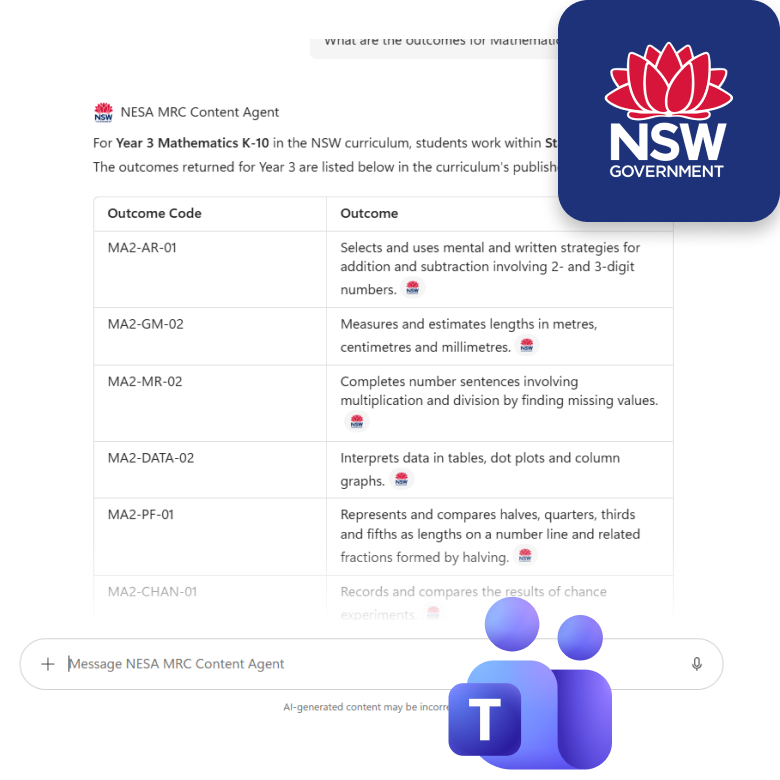
What it offers an AI assistant is a short list of things it can do: find a syllabus, see what a focus area contains, look up an item's history, follow the links between items. The assistant connects, sees what is available, and can then answer questions about the NSW curriculum using the current published version.
That last part is the point. Without it, an assistant answers from what it picked up in training, or from searching the site. The search route is the more dangerous one. It can find the right content and still hand back an answer that has been reworded, reordered or cut short, with nothing to guarantee the teacher sees the full picture.
The server runs on Microsoft Azure and is connected to Microsoft 365 Copilot and Microsoft Teams, where NESA staff already work. It is built and in testing with the NESA team now.
To be clear about scope: Copilot and Teams are how NESA's own people reach the curriculum, and there is no plan to roll either out to teachers. Teachers would reach it through whichever AI assistant they already use, which is the whole point of publishing it this way.
What the MCP server adds over pointing Copilot straight at the API
A fair question, since the API already exists. Six things it would otherwise be up to every AI assistant to work out for itself.
- →Plain-English tools instead of raw technical calls. The assistant is handed a set of named tasks it can ask for. It doesn't need to know the query language, which of the three data sources to use, or any internal reference codes.
- →Curriculum know-how, built in. Ten rules we learnt the hard way are written into the server, such as the difference between a learning area and a syllabus, or how a stage maps to a school year. Every assistant that connects starts with them instead of working them out again.
- →Bad requests stopped early. A malformed request is caught before it reaches the curriculum API, and anything that does go wrong comes back as a clear message rather than a technical error.
- →The same answer on every platform. Copilot, Claude or anything else that speaks the protocol gets the same access and the same result, instead of each one being wired up differently and landing somewhere different.
- →Answers sized for AI to read. Content comes back in a tidy format, in sensible chunks, with only the fields that were asked for, so the assistant isn't handed pages of markup it doesn't need. That keeps answers quicker and cheaper.
- →Everyday words understood. "Arts" finds creative arts, "Humanities" sorts out which HSIE subject is meant. A question asked the way people talk still finds the right syllabus.
Azure AI Search as a second way in, for questions phrased loosely rather than by name, and ready-made instruction templates for particular uses. Neither is committed work and we are not claiming either.
- Kontent.ai
- Azure API Management
- Azure AI Search
- Azure App Service
- Microsoft 365 Copilot
- Microsoft Teams
- Model Context Protocol
Watch: a syllabus question answered in Microsoft Teams
The Hard Part: Modelling Curriculum Data for Both AI Clients and Teachers
The hardest part of this project was not connecting systems together, moving platforms or making things fast. It was deciding how the curriculum should be structured in the first place.
A curriculum is genuinely complicated. Learning areas contain syllabuses, syllabuses run across stages, stages carry focus areas, and focus areas carry outcomes and content points. Almost everything links to something else, across stages, across life-skills pathways, and across the K–10 and senior boundary, where the same course can legitimately appear more than once. Getting that structure right is hard on its own.
- →Syllabuses that don't work the same way. One structure had to hold them all: K–10 and senior, extensions, language examples, elective content and more, and the reading experience had to make sense for each.
- →A reform happening mid-flight. Some content fully reformed and on the new platform, some partly reformed, some still on an older system entirely, all managed from one place. And new features were being designed and built while content was being entered, against ministerial release dates that do not move.
The real difficulty was that the same content had to suit two quite different readers. Software needs the links between things spelled out exactly, with nothing left implied and nothing that only makes sense once you have seen the page. A teacher needs to look at the curriculum and understand it, laid out visually, in the order they think in, with the emphasis a document gives you and a plain data structure doesn't.
There is a second gap underneath that one. The way content is organised inside the CMS is built for the people entering it, and the printed documents understand its quirks and handle them. Those quirks are not appropriate for an outside audience reading the curriculum as data. So as well as reshaping the content for AI to read, we had to smooth over differences that matter a great deal to NESA's content team and mean nothing to anyone reading the API.
Build only for the machine and you get something correct that teachers won't use. Build only for the teacher and you get something readable that software will confidently misread, which is worse than useless when the subject is what a child is meant to be taught.
The mistake a less experienced team makes here is treating the machine-readable version as an export you generate at the end. It isn't a formatting job. If the structure underneath is unclear, no later conversion can make it clear. It can only guess, consistently, and be wrong in a way nobody notices until a teacher does.
Machine Readable Curriculum Results: What NESA Can Now Publish to AI Clients
The NSW curriculum is now published in a form software can read, with its full history intact, through an API NESA controls and monitors.
In practical terms:
- →NESA's curriculum team runs releases itself. Publishing, change reports and exports no longer need a developer.
- →There is one official copy of the curriculum. A site, a document generator or an AI assistant all read the same source, through the same access rules.
- →Older versions can still be read, not just archived. Anyone can ask what a syllabus said at an earlier release and get an answer, which is what a document with legal weight requires.
- →AI assistants can read the current NSW curriculum. From the published syllabus, rather than from training data or a web search. In testing now with the NESA team, from Microsoft 365 Copilot and Microsoft Teams.
- →NESA can see who is reading the curriculum. Every request is logged against the organisation that made it, which is what has to be in place before access is ever opened more widely.
Next Phase: MCP Server Rollout and AI-Assisted Lesson Planning for NSW Teachers
The MCP server is in testing with the NESA team. Next comes rollout, and after that the interesting part.
Once a teacher can reach the curriculum through the AI assistant they already use, work that means reading across many pages and piecing it together becomes something you can simply ask for. Comparing a focus area with its previous version. Building a teaching program from the outcomes for a stage. Seeing the curriculum arranged the way you think about it rather than the way it appears on screen, while knowing it is the current published syllabus and nothing has been made up.
Further out, the same groundwork would support things we are not building yet: practice questions, assessment support, tutoring tools. None of that is committed work and we are not claiming it. It is worth saying only because it explains why the structure matters. Publishing the curriculum as data was never a feature. It is the layer everything after it stands on.
Key Takeaways: MCP Server and Content API Lessons from NESA
How the content is structured is the project. Everything else follows from it. We could rebuild the API, change the CMS or replace the MCP server without touching how the curriculum is organised. Get that wrong and everything reading it inherits the confusion, permanently. If you want AI to read your content, the work is not the AI part. It is being honest about whether your content is genuinely organised or just laid out on pages.
Design for both readers, or you design for neither. Content only a machine can use gets abandoned by the people who own it. Content only a person can read has to be guessed at by every system that reads it. You need one structure that is exact enough for software and clear enough for a person, and that is harder than either on its own.
Who pays per question is a design decision, not a detail. A chatbot puts the running cost on the organisation publishing the content, so a budget caps how useful it can be. An MCP server puts it on the person asking, so it scales to everyone. For a public body serving a whole state, that decides whether the thing can exist at all.
History is not something you add later. If your content has legal, regulatory or audit weight, keeping past versions has to be built in from day one. Adding it to a platform that has been overwriting content is not an upgrade, it's an excavation.
Frequently Asked Questions: MCP Servers, Content APIs and Curriculum Data
Get the Content Model Framework We Used on the NSW Curriculum
Before any of this worked, we had to organise a curriculum so that software and teachers could both read it. The framework we used is two pages: how to test whether your content is genuinely clear rather than only clear to the people who wrote it, and the questions to ask before you let AI read it. It's yours.
Terms on this page, in plain words
- Machine Readable Curriculum (MRC)
- NESA's own term, used in its published tender: the NSW curriculum in a form software can read, not only people. In practice, a store of the curriculum that keeps every past version, a content API, and an admin portal NESA runs.
- Content API
- A controlled way for one system to ask another for content. Instead of copying files around, an approved system asks for what it needs and gets an exact answer back.
- Model Context Protocol (MCP)
- An agreed way for AI assistants to connect to an outside source of information. An MCP server is the software that offers your content to those assistants, so they can read it on demand, using the subscription the person already has.
- Headless CMS
- A content management system that stores content on its own, with no page design attached, so the same content can be published to a site, a document, an API or an AI assistant. Kontent.ai, formerly Kentico Kontent, is the one used here.
- Azure API Management
- Microsoft's front door for APIs. It issues each organisation a key, logs every request against it, and keeps recent answers on hand so the API stays fast. Everyone reading the curriculum comes through it.
Have a project in mind? Let's chat now
Thirty minutes, no pitch deck. Tell us what content you're sitting on and we'll tell you honestly whether an MCP server is the right answer.
Contact us today